# Nubzuki Jump
- Name: Tomas Horsky
- ID: 20256426
- Email: tomashorsky@kaist.ac.kr
- Git Repository: https://git.prototyping.id/20256426/NubzukiJump
- Demo Video: https://www.youtube.com/watch?v=E3_a1b5RLrk
## How to use and play
```bash
npm install
npm run dev
```
Then play the game either by using the arrow keys (smoother), or enable camera controls and move by moving your head.
## Description of the game
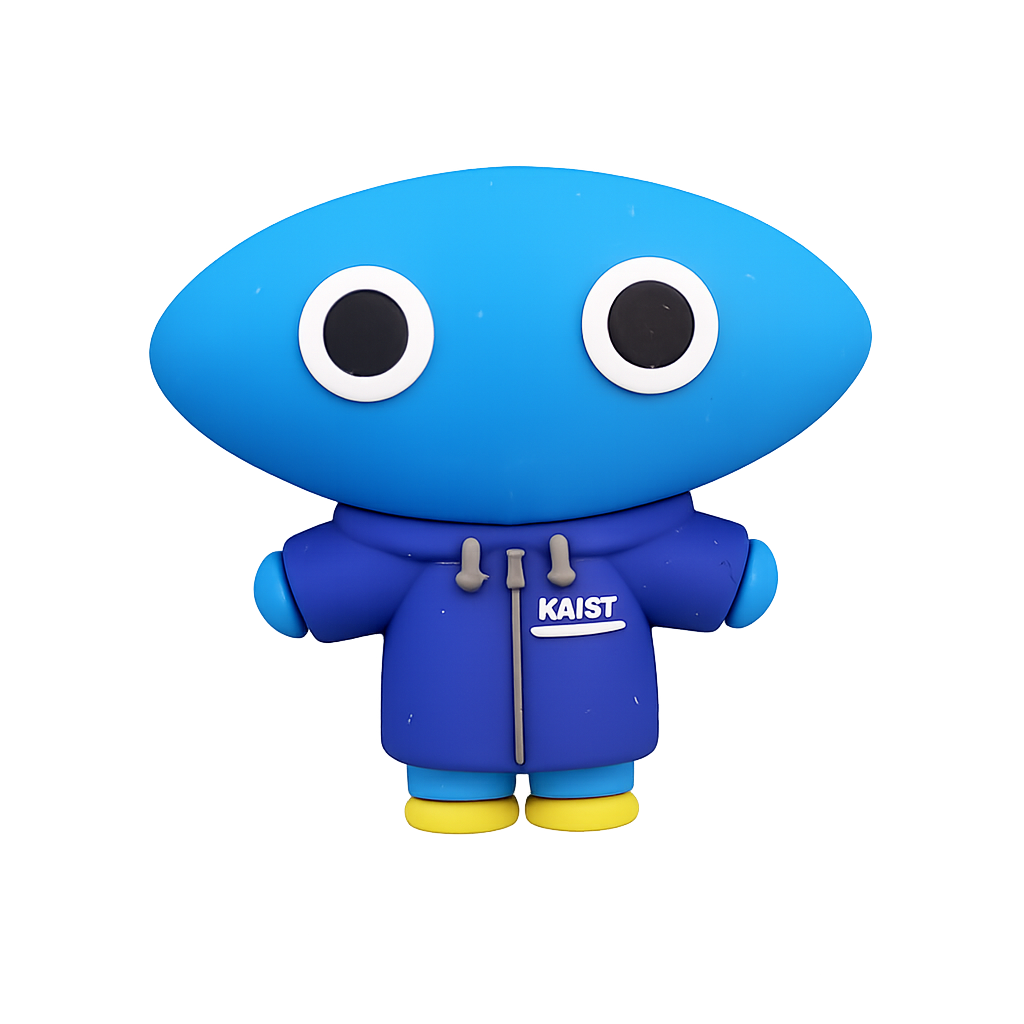 Nubzuki Jump is a simple 2D platformer game where the player controls Nubzuki. The goal is to jump on platforms and reach as high as possible without falling down. The game features four different types of platforms, which are introduced as the player progresses:
1. **Basic platform**
2. **Moving platform** – moves horizontally
3. **Spring platform** – boosts the player's jump
4. **One-time platform** – disappears after one jump
The player can only move left and right; jumping happens automatically whenever the player lands on a platform. The game can be controlled either using the **arrow keys** or by enabling **camera control** and moving the head left or right.
## Code Organization
The code is divided into two main parts: the Svelte app (`App.svelte` and `CameraControl.svelte`) and the game logic inside `src/game`. `App.svelte` is responsible for the page layout, displaying the leaderboard, and handling the game state (start, playing, game over).
The `CameraControl.svelte` component handles enabling camera control and visualizing the detected head movement.
The game logic is split into several files:
1. `game.js` – initializes the game and handles the main game loop
2. `player.js` – contains logic related to the player character (movement, state)
3. `platforms.js` – handles creation and management of platforms
4. `platformTypes.js` – defines behavior and visuals of different platform types
5. `cameraControl.js` – handles camera input and head movement detection
6. `constants.js` – stores game constants and configuration
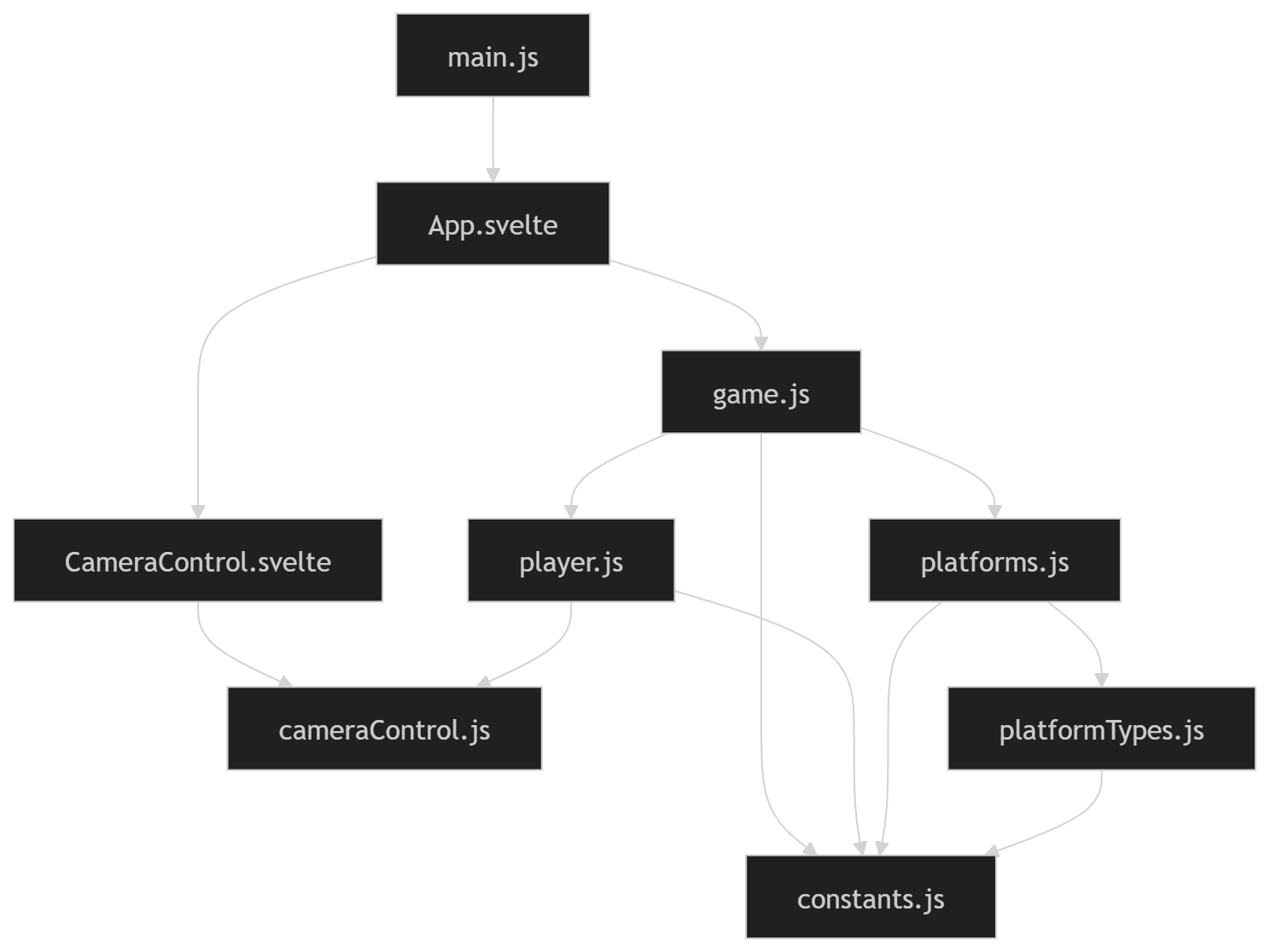
The way different parts of the application are connected and communicate can be seen in the following diagram:
## Implementation
Nubzuki Jump is a simple 2D platformer game where the player controls Nubzuki. The goal is to jump on platforms and reach as high as possible without falling down. The game features four different types of platforms, which are introduced as the player progresses:
1. **Basic platform**
2. **Moving platform** – moves horizontally
3. **Spring platform** – boosts the player's jump
4. **One-time platform** – disappears after one jump
The player can only move left and right; jumping happens automatically whenever the player lands on a platform. The game can be controlled either using the **arrow keys** or by enabling **camera control** and moving the head left or right.
## Code Organization
The code is divided into two main parts: the Svelte app (`App.svelte` and `CameraControl.svelte`) and the game logic inside `src/game`. `App.svelte` is responsible for the page layout, displaying the leaderboard, and handling the game state (start, playing, game over).
The `CameraControl.svelte` component handles enabling camera control and visualizing the detected head movement.
The game logic is split into several files:
1. `game.js` – initializes the game and handles the main game loop
2. `player.js` – contains logic related to the player character (movement, state)
3. `platforms.js` – handles creation and management of platforms
4. `platformTypes.js` – defines behavior and visuals of different platform types
5. `cameraControl.js` – handles camera input and head movement detection
6. `constants.js` – stores game constants and configuration
The way different parts of the application are connected and communicate can be seen in the following diagram:
## Implementation
 I used **Svelte 5** with runes in combination with **p5** and **p5play**. At first, I thought I would use Svelte a lot, but since the game is basically just a p5 canvas, I used Svelte only for the layout outside of the game. I used **p5play** to help me with the physics, the player and platforms are **Sprites** (game objects from the **p5play** library) which simplifies collision handling and jumping. The world movement could also have been implemented p5play (utiliazing camera movement feature), but I decided to implement it on my own.
I implemented the game basically on my own, without prompting AI to generate code for me, but I used Copilot to help me code faster. However, I used AI for the Svelte layout part and the camera control. Making the camera control work was quite a long process, because the head movement detection is quite performance-heavy and difficult to make smooth in real time. I tried a few different libraries and landed on MediaPipe FaceLandmarker, which, in combination with lowering the video quality and detection frequency, works quite well.
The main functions of the game are:
- `updateGame()` – handles the game loop by updating the player (`movePlayer()`), moving the world (`moveWorld()`), and checking if the player has fallen
- `movePlayer()` – processes player movement and triggers jumps when landing on platforms
- `moveWorld()` – gradually moves the world upward and generates new platforms when needed (`generateNewPlatforms()`)
- `generateNewPlatforms()` – fills empty space with platforms, types are chosen based on player elevation and randomness
- `updateCameraControl()` – processes camera input by detecting head (nose) position (left, center, right)
## Issues
The main issue I was not able to fully solve is that when using camera control, the game becomes slower and slightly laggy. I improved it by lowering the camera resolution and reducing the detection frequency, but it is still not perfect. Additionally, I encountered circular dependency issue from Svelte’s internal modules which I was not able to resolve, but it does not affect the game in anyway.
## Resources and Acknowledgements
- [P5play tutorial](https://p5play.org/learn/sprite) and [P5play documentation](https://p5play.org/docs) – helped me learn and use the P5play library
- **GitHub Copilot** – helped me code faster
- **ChatGPT** – helped me with implementing camera controls, svelte layout and with debugging
I used **Svelte 5** with runes in combination with **p5** and **p5play**. At first, I thought I would use Svelte a lot, but since the game is basically just a p5 canvas, I used Svelte only for the layout outside of the game. I used **p5play** to help me with the physics, the player and platforms are **Sprites** (game objects from the **p5play** library) which simplifies collision handling and jumping. The world movement could also have been implemented p5play (utiliazing camera movement feature), but I decided to implement it on my own.
I implemented the game basically on my own, without prompting AI to generate code for me, but I used Copilot to help me code faster. However, I used AI for the Svelte layout part and the camera control. Making the camera control work was quite a long process, because the head movement detection is quite performance-heavy and difficult to make smooth in real time. I tried a few different libraries and landed on MediaPipe FaceLandmarker, which, in combination with lowering the video quality and detection frequency, works quite well.
The main functions of the game are:
- `updateGame()` – handles the game loop by updating the player (`movePlayer()`), moving the world (`moveWorld()`), and checking if the player has fallen
- `movePlayer()` – processes player movement and triggers jumps when landing on platforms
- `moveWorld()` – gradually moves the world upward and generates new platforms when needed (`generateNewPlatforms()`)
- `generateNewPlatforms()` – fills empty space with platforms, types are chosen based on player elevation and randomness
- `updateCameraControl()` – processes camera input by detecting head (nose) position (left, center, right)
## Issues
The main issue I was not able to fully solve is that when using camera control, the game becomes slower and slightly laggy. I improved it by lowering the camera resolution and reducing the detection frequency, but it is still not perfect. Additionally, I encountered circular dependency issue from Svelte’s internal modules which I was not able to resolve, but it does not affect the game in anyway.
## Resources and Acknowledgements
- [P5play tutorial](https://p5play.org/learn/sprite) and [P5play documentation](https://p5play.org/docs) – helped me learn and use the P5play library
- **GitHub Copilot** – helped me code faster
- **ChatGPT** – helped me with implementing camera controls, svelte layout and with debugging